
🍳 Kitchen Display
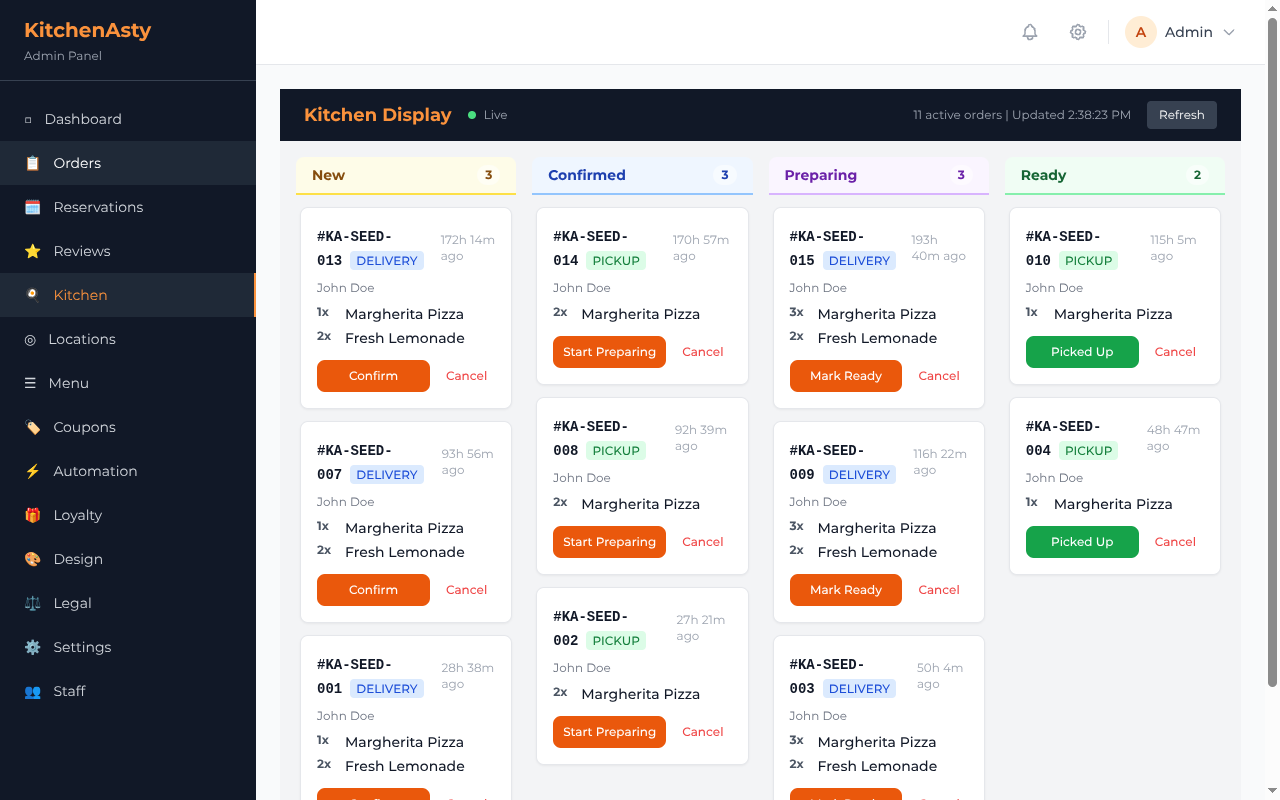
The Kitchen Display System (KDS) is a real-time order board powered by Socket.IO. It shows incoming orders to kitchen staff and allows status updates without refreshing the page.
⚙️ How It Works
- 🛒 A customer places an order via the storefront
- 📡 The server emits a Socket.IO event to the
kitchenroom - 📺 The admin kitchen display board receives the event and adds the order
- 👨🍳 Kitchen staff update the order status (e.g., Preparing → Ready)
- 🔄 Status updates are broadcast in real-time to all connected clients
📡 Socket.IO Events
⬇️ Server → Client
| Event | Payload | Description |
|---|---|---|
order:created | Order object | 🆕 New order placed |
order:updated | Order object | 🔄 Order status changed |
⬆️ Client → Server
| Event | Payload | Description |
|---|---|---|
join:kitchen | { locationId } | 🔗 Join the kitchen room for a location |
🏠 Kitchen Room
Each location has its own kitchen room. When a staff member opens the kitchen display, the client joins:
javascript
socket.emit('join:kitchen', { locationId: 'location-id' });Events are only broadcast to clients in the relevant location's room.
🔄 Status Updates from Kitchen
Staff click status buttons on the kitchen display to advance the order through its lifecycle:
PENDING → CONFIRMED → PREPARING → READYEach status change calls PATCH /api/orders/:id/status and triggers real-time events.
🔌 Integration
The kitchen display is part of the admin dashboard. It uses React with Socket.IO client to maintain a live connection to the server.
See Real-Time Events for the full event architecture.