
⚙️ Settings
The admin settings dashboard provides a centralized UI for managing operational configuration that was previously only available through environment variables. Settings are stored in the database and take priority over environment variables, with automatic fallback.
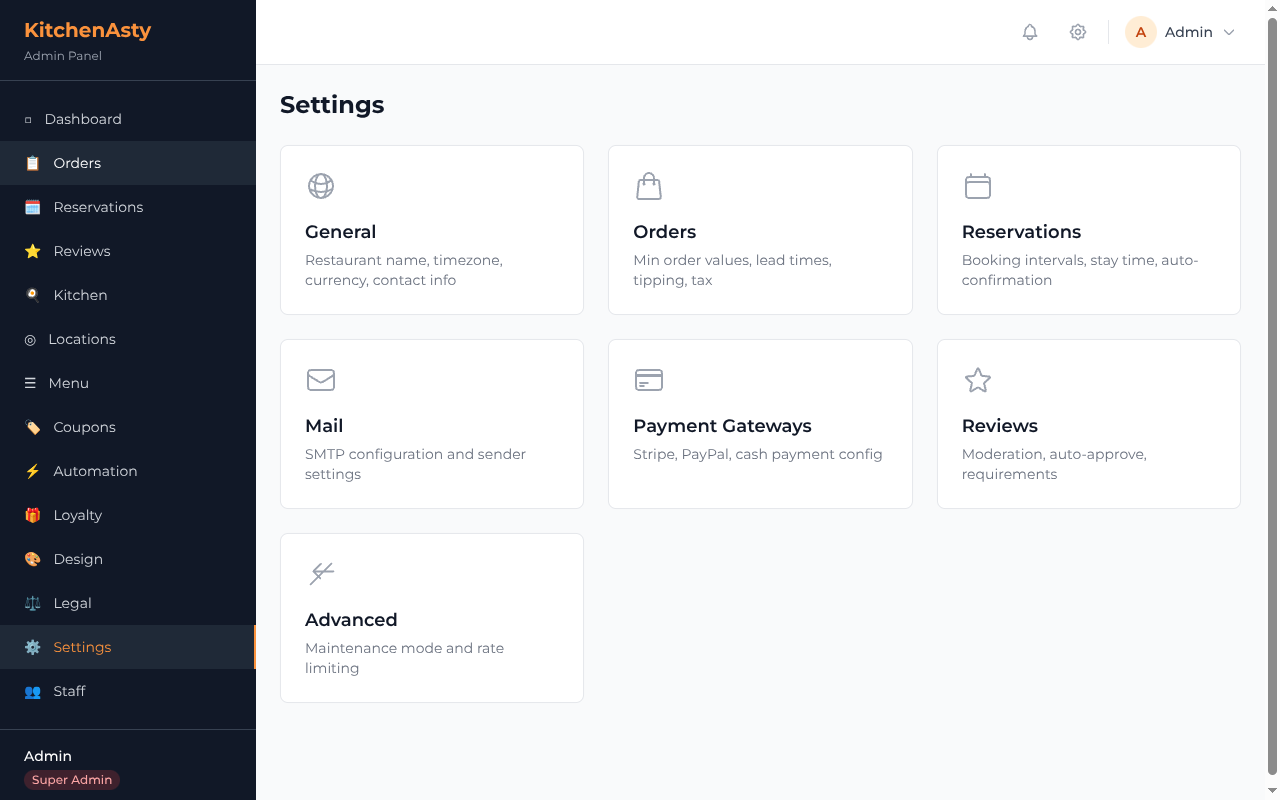
📋 Settings Groups
🏪 General
Basic restaurant configuration:
| Field | Description |
|---|---|
contactEmail | 📧 Public contact email address |
contactPhone | 📱 Public contact phone number |
timezone | 🕐 IANA timezone (e.g. America/New_York) |
distanceUnit | 📏 km or mi |
defaultCurrency | 💱 3-letter currency code (e.g. USD) |
currencySymbol | 💲 Symbol displayed with prices (e.g. $) |
currencyPosition | 🔄 before or after the amount |
googleMapsApiKey | 🗺️ Google Maps API key for delivery zones |
📦 Orders
Online ordering configuration:
| Field | Description |
|---|---|
enabled | ✅ Enable/disable online ordering |
minOrderDelivery | 🚚 Minimum order amount for delivery |
minOrderPickup | 🏪 Minimum order amount for pickup |
deliveryLeadTime | ⏱️ Default delivery lead time in minutes |
pickupLeadTime | ⏱️ Default pickup lead time in minutes |
enableFutureOrdering | 📅 Allow customers to schedule future orders |
enableTipping | 💰 Show tipping options at checkout |
tipOptions | 💵 Array of tip percentages (e.g. [10, 15, 20, 25]) |
taxRate | 🧾 Tax rate percentage |
🪑 Reservations
Booking configuration:
| Field | Description |
|---|---|
enabled | ✅ Enable/disable reservations |
timeInterval | ⏱️ Time slot interval in minutes |
stayTime | 🕐 Average reservation duration in minutes |
maxAdvanceBookingDays | 📅 How far in advance customers can book |
minCancellationNoticeHours | ⏰ Minimum cancellation notice required |
autoConfirm | 🤖 Automatically confirm new reservations |
📧 Mail
SMTP email configuration (Super Admin only):
| Field | Description |
|---|---|
smtpHost | 🖥️ SMTP server hostname |
smtpPort | 🔌 SMTP server port |
smtpUser | 👤 SMTP username |
smtpPass | 🔑 SMTP password (masked in responses) |
senderName | 📛 Email sender display name |
senderEmail | 📧 Email sender address |
encryption | 🔒 none, tls, or ssl |
A Send Test Email feature lets you verify the configuration works.
💳 Payment Gateways
Payment provider configuration (Super Admin only):
Stripe:
| Field | Description |
|---|---|
stripeEnabled | ✅ Enable Stripe payments |
stripePublishableKey | 🔑 Stripe publishable API key |
stripeSecretKey | 🔐 Stripe secret key (masked) |
stripeWebhookSecret | 🛡️ Stripe webhook signing secret (masked) |
PayPal:
| Field | Description |
|---|---|
paypalEnabled | ✅ Enable PayPal payments |
paypalClientId | 🔑 PayPal client ID |
paypalClientSecret | 🔐 PayPal client secret (masked) |
paypalSandbox | 🧪 Use PayPal sandbox environment |
Cash:
| Field | Description |
|---|---|
cashEnabled | 💵 Enable cash on delivery |
⭐ Reviews
Review moderation configuration:
| Field | Description |
|---|---|
enabled | ✅ Enable customer reviews |
requireOrder | 📦 Require a completed order to leave a review |
autoApprove | 🤖 Auto-approve new reviews without moderation |
minimumRating | ⭐ Minimum allowed rating (1-5) |
🔧 Advanced
System-level settings (Super Admin only):
| Field | Description |
|---|---|
maintenanceMode | 🚧 Put the storefront in maintenance mode |
maintenanceMessage | 💬 Message shown during maintenance |
enableRateLimiting | 🛡️ Enable API rate limiting |
🔐 Role-Based Access
| Group | MANAGER | SUPER_ADMIN |
|---|---|---|
| 🏪 General | Yes | Yes |
| 📦 Orders | Yes | Yes |
| 🪑 Reservations | Yes | Yes |
| ⭐ Reviews | Yes | Yes |
| No | Yes | |
| 💳 Payment Gateways | No | Yes |
| 🔧 Advanced | No | Yes |
🔒 Secret Masking
Sensitive fields (SMTP password, Stripe secret key, Stripe webhook secret, PayPal client secret) are masked in GET responses using the format first4...last4. When saving, if the submitted value contains ..., the existing value is preserved.
🗄️ DB-First Resolution
The email transporter, Stripe client, and PayPal client all read configuration from the database first, falling back to environment variables if no database settings exist. The email transporter is cached with a 5-minute TTL. The Stripe client is recreated only when the secret key changes.